TTRI
Tile Operation Diagram
Introduction
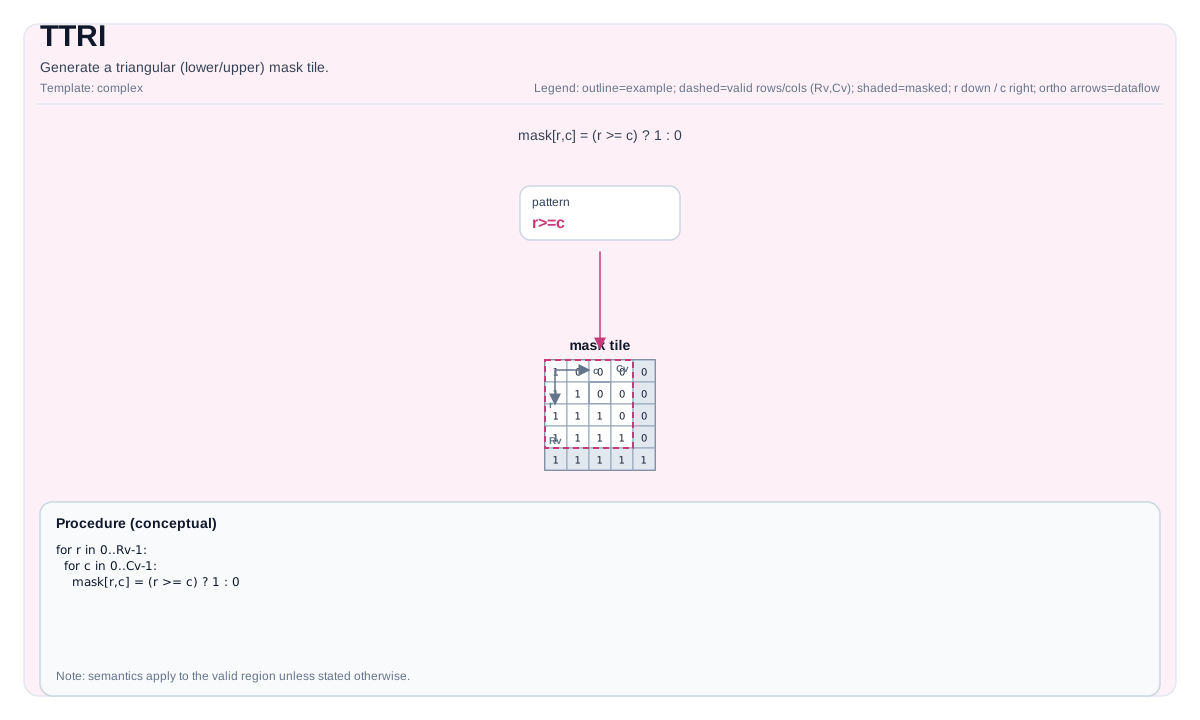
Generate a (lower/upper) triangular mask tile with ones and zeros. The triangular orientation is controlled by the compile-time template parameter isUpperOrLower (0 = lower, 1 = upper).
Math Interpretation
Let R = dst.GetValidRow() and C = dst.GetValidCol(). Let d = diagonal.
Lower-triangular (isUpperOrLower=0) conceptually produces:
\[
\mathrm{dst}_{i,j} = \begin{cases}1 & j \le i + d \\\\ 0 & \text{otherwise}\end{cases}
\]
Upper-triangular (isUpperOrLower=1) conceptually produces:
\[
\mathrm{dst}_{i,j} = \begin{cases}0 & j < i + d \\\\ 1 & \text{otherwise}\end{cases}
\]
C++ Intrinsic
Declared in include/pto/common/pto_instr.hpp:
template <typename TileData, int isUpperOrLower, typename... WaitEvents>
PTO_INST RecordEvent TTRI(TileData &dst, int diagonal, WaitEvents &... events);
Constraints
isUpperOrLowermust be0(lower) or1(upper).- Implementation checks (A2A3):
- Destination tile must be row-major (
isRowMajor), enforced bystatic_assert. - Supported element types:
int32_t,int,int16_t,uint32_t,uint16_t,half,float16_t,float,float32_t.
- Destination tile must be row-major (
- Implementation checks (A5):
- Supported element types:
int32_t,int16_t,int8_t,uint32_t,uint16_t,uint8_t,half,float16_t,float32_t,bfloat16_t. - Lower (
upperOrLower == 0) and upper (upperOrLower == 1) are distinguished byif constexprbranches.
- Supported element types:
- Valid region is obtained via
dst.GetValidRow()/dst.GetValidCol().
Assembly Syntax
AS Level 1 (SSA)
%dst = pto.ttri %diag : i32 -> !pto.tile<...>
AS Level 2 (DPS)
pto.ttri ins(%diag : i32) outs(%dst : !pto.tile_buf<...>)
Examples
#include <pto/pto-inst.hpp>

using namespace pto;

void example_lower() {
  using TileT = Tile<TileType::Vec, float, 16, 16>;
  TileT dst;
  TASSIGN(dst, 0x1000);
  TTRI<0>(dst, /*diagonal=*/0);   // lower triangular
}

void example_upper() {
  using TileT = Tile<TileType::Vec, float, 16, 16>;
  TileT dst;
  TASSIGN(dst, 0x1000);
  TTRI<1>(dst, /*diagonal=*/-1);  // upper triangular
}
ASM Form Examples
Auto Mode
# Auto mode: compiler/runtime-managed placement and scheduling.
%dst = pto.ttri {isUpperOrLower = 0} : i32 -> !pto.tile<...>
Manual Mode
# Manual mode: resources must be bound explicitly before issuing the instruction.
# pto.tassign %arg0, @tile(0x1000)
%dst = pto.ttri %diag : i32 -> !pto.tile<...>
PTO Assembly Form
%dst = pto.ttri %diag : i32 -> !pto.tile<...>
# AS Level 2 (DPS)
pto.ttri ins(%diag : i32) outs(%dst : !pto.tile_buf<...>)